Facial-Recognition Intrusion Detection

Your face is
the only key.

Face Vault is a secure biometric file vault. No passwords, no tokens — users unlock their documents with a live face scan, verified by a challenge-response liveness protocol, while every failed attempt is captured, logged and served to the administrator as forensic evidence.
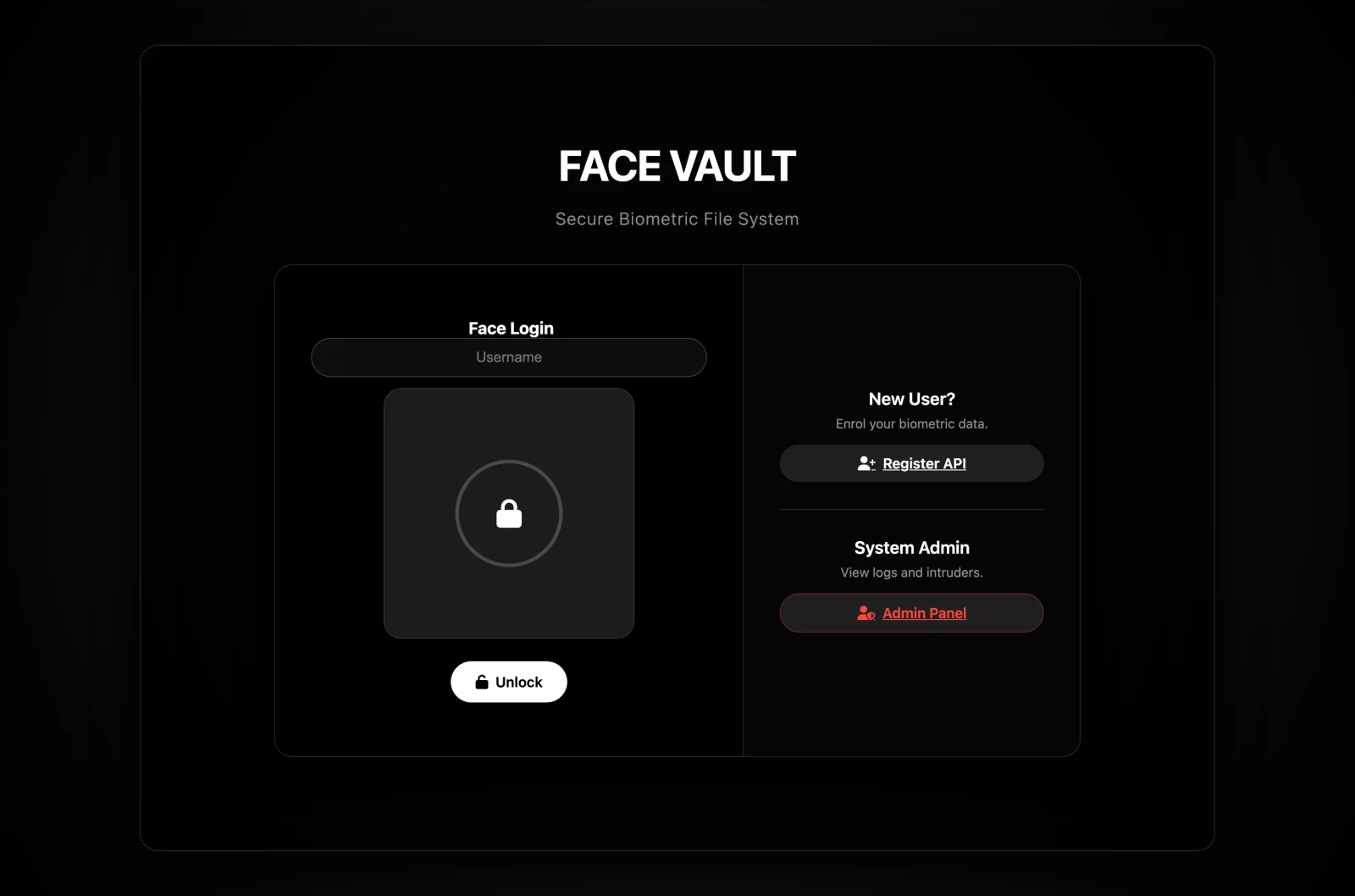
Face Vault landing page with face login and live webcam preview
The Problem

Passwords are the weakest link in modern security.

81% of data breaches trace back to weak or stolen passwords (Verizon, 2023). Credentials can be phished, brute-forced or shared — a face cannot. Yet most facial-recognition products stop at authentication: they neither detect intrusion attempts nor keep the visual evidence needed for incident response. Face Vault closes both gaps in a single system.

81%
of breaches involve weak or stolen passwords
512-D
ArcFace embedding per face, matched by cosine distance
< 2s
end-to-end login, including live capture
100%
of printed-photo attacks rejected in testing
How It Works

One login. Three round trips. Zero passwords.

Every unlock is a live, server-verified interaction — a captured frame set can never be replayed.

Random Liveness Challenge

The server issues a single-use challenge — blink, turn left, turn right, or smile — valid for just 60 seconds. The action is chosen randomly per attempt, so an attacker cannot pre-record a response.

Six Frames, Three Checks

The browser captures a short frame burst. The server runs face detection on every frame, verifies identity consistency between frames, confirms the requested motion actually happened, and rejects static or replayed imagery.

One-to-One Verification

The verified embedding is compared against that user's stored templates with a single vectorized cosine match. Pass, and the vault opens — the new embedding also feeds adaptive learning. Fail, and the frame goes straight to the intruder log.

Core Features

Authentication, detection and forensics — one system.

Challenge-Response Liveness

Four randomized actions, 60-second single-use challenges, per-frame quality gates and a no-motion guard defeat printed photos and video replays.

1:1 Face Verification

Username-gated matching means constant-time lookups and no account enumeration — unknown users and failed matches get the same Access denied.

Adaptive Learning

Each successful login appends the fresh embedding to the user's profile (capped at 30, FIFO), so beards, glasses and aging never force re-enrolment.

Intruder Capture

Every failed attempt with a usable face writes a JPEG snapshot plus a database record — timestamp, claimed username and match distance — with a 30-day privacy-bounded retention window.

Security Console

A live admin dashboard with success-rate and confidence analytics, a chronological access history and a click-to-enlarge intruder gallery for incident review.

Hardened by Default

CSRF tokens on every state change, per-IP rate limits, a 15-minute admin lockout after ten failures, PBKDF2-hashed credentials and HttpOnly / SameSite session cookies.

Screens

Every screen, captured from the running system.

Dark glass panels, one accent for primary actions, red for privileged ones — designed to keep the focus on the webcam preview.

Landing page — face login with username field, webcam preview and unlock button
Landing

Face Login

The entry point pairs a username field with a live webcam preview framed by the unlock ring. One tap on Unlock triggers the full liveness-then-match sequence.

  • Liveness prompt with five-second countdown
  • Secondary paths to enrolment and the admin panel
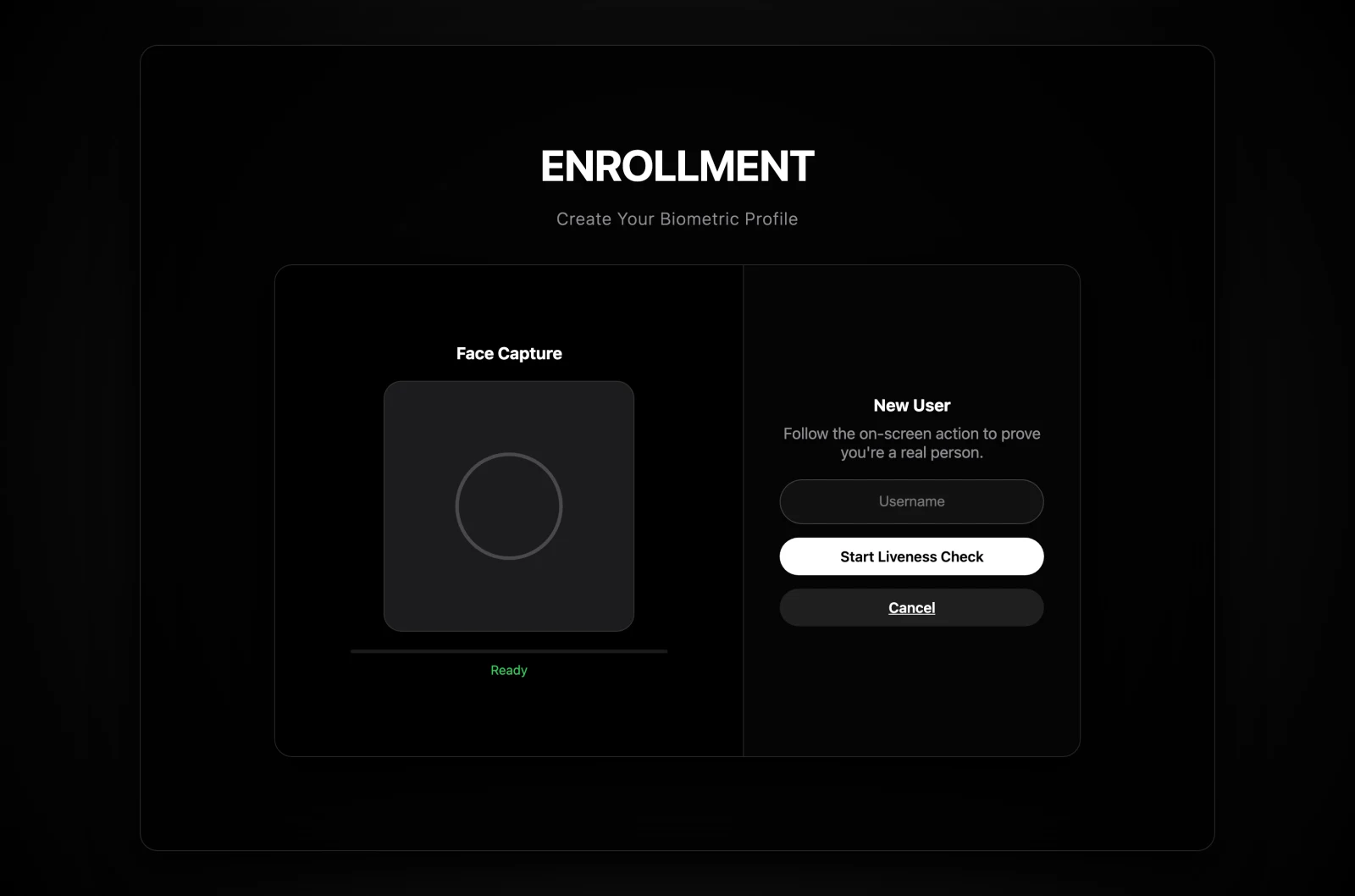
Enrolment screen — face capture panel with liveness progress bar
Enrolment

Biometric Registration

New users prove they are a live person before an account exists: the same challenge-response protocol guards enrolment, and the verified embedding becomes the first stored template.

  • Guided on-screen action with progress feedback
  • Optional invite-code gate for closed deployments
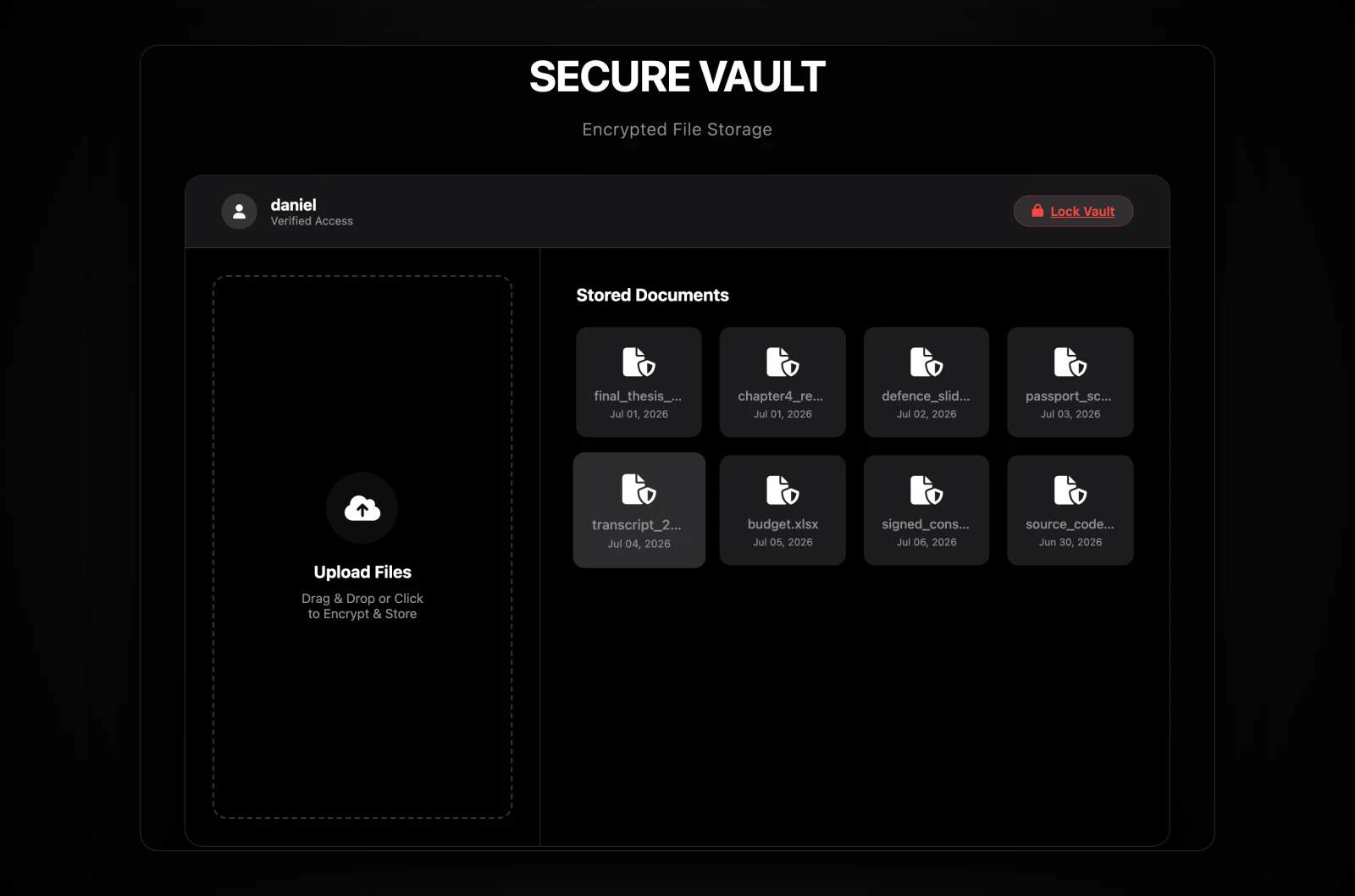
Secure vault dashboard — drag-and-drop upload zone and stored document grid
Vault

Personal File Vault

After a verified unlock, the user lands in their private vault: drag-and-drop uploads on the left, the stored document grid on the right. Ownership checks return HTTP 403 for any cross-user access.

  • Per-user storage with collision-safe filenames
  • Path-traversal defence on every download
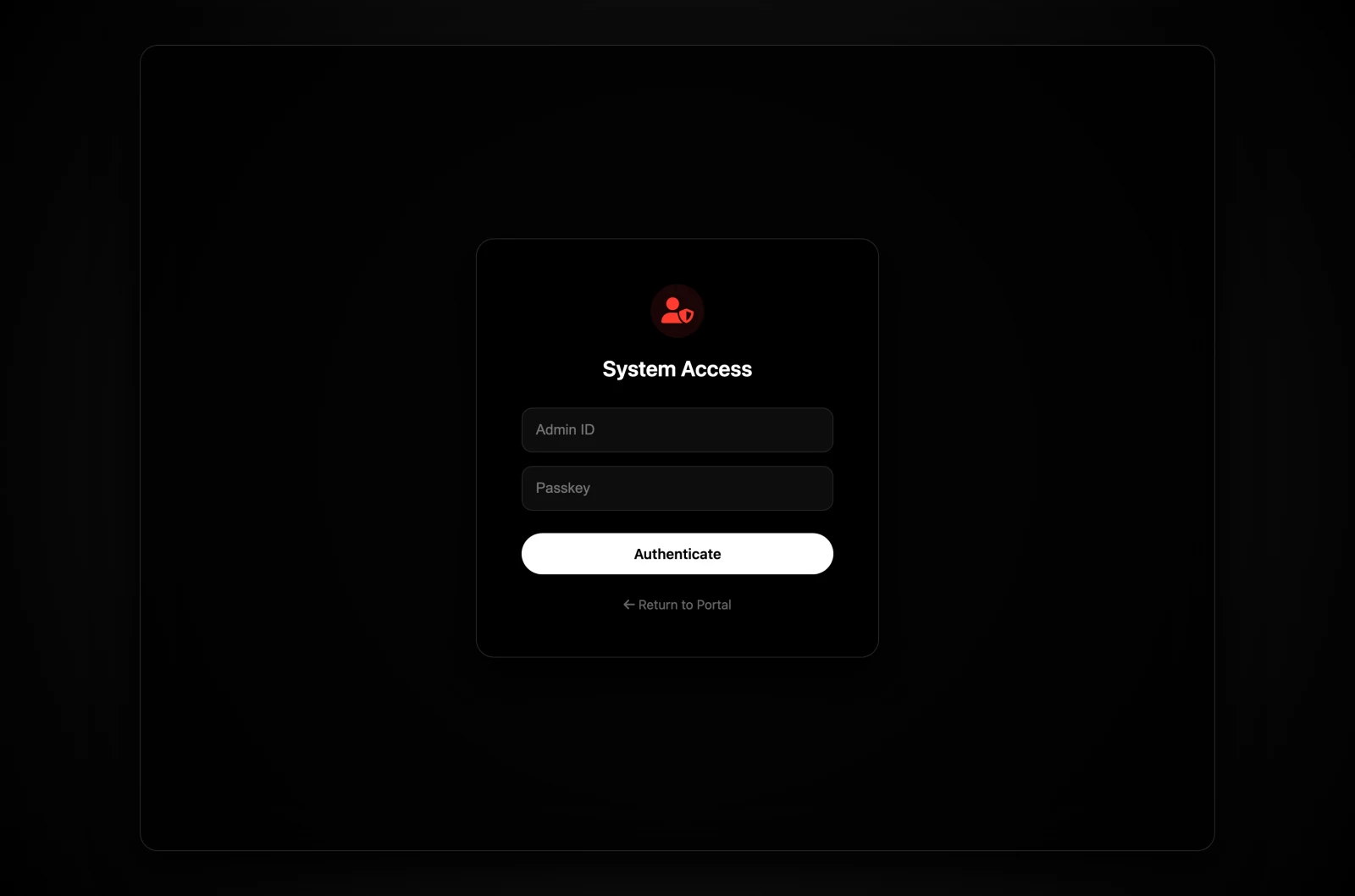
Admin authentication form with red shield styling
Admin Access

Privileged Authentication

The administrative gate is deliberately styled as a different mode of access. Credentials are checked against a PBKDF2-SHA-256 hash — the plaintext password is discarded at startup and there is no default credential to exploit.

  • Five attempts per minute, per IP
  • Ten consecutive failures trigger a 15-minute lockout
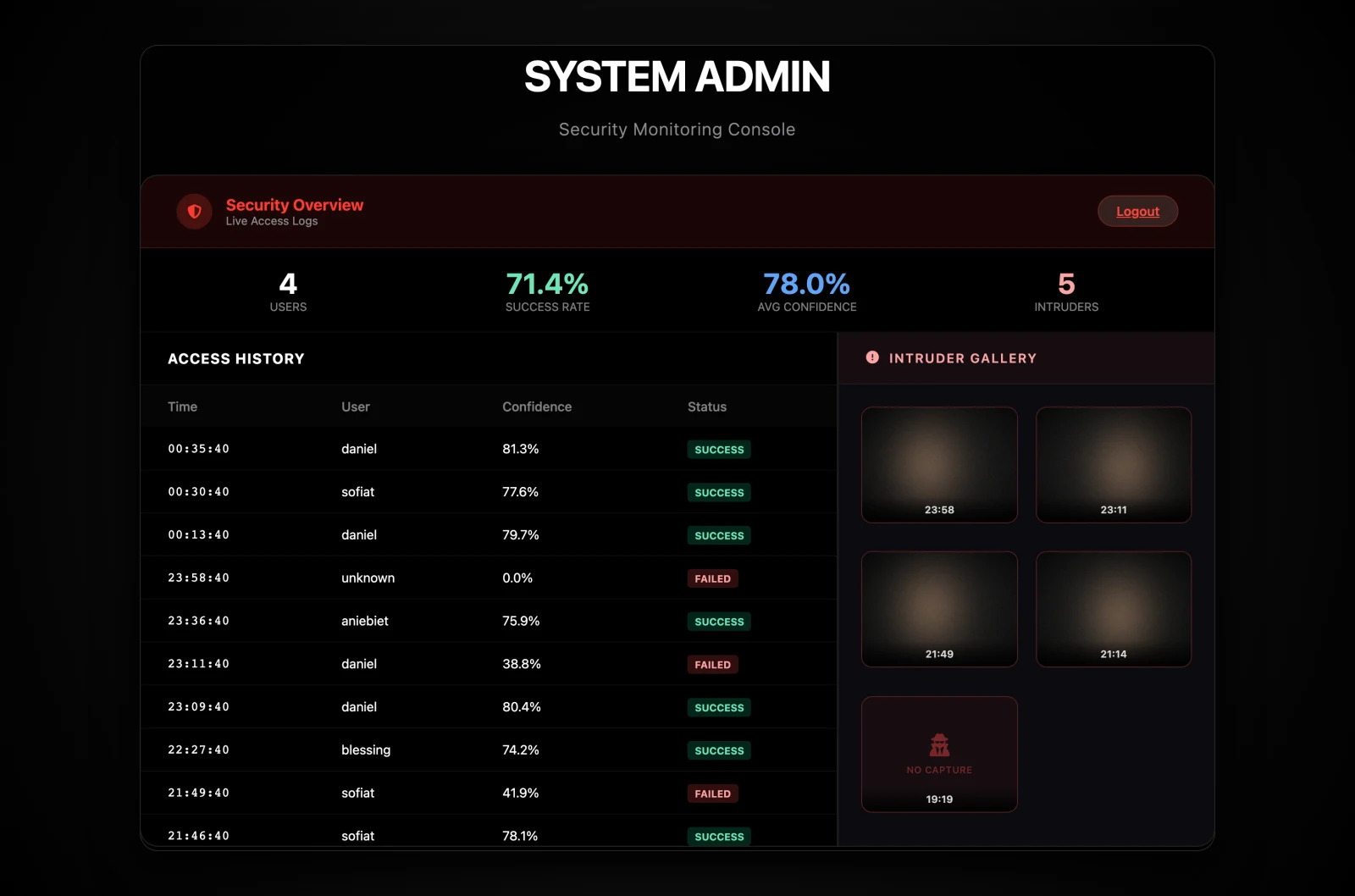
Security monitoring console — stats ribbon, access history table and intruder gallery
Console

Security Monitoring Console

The metric ribbon summarizes enrolled users, success rate, average match confidence and intrusion count. Below it, the live access history and the intruder gallery turn failed attempts into reviewable evidence.

  • Failed attempts map to visibly degraded confidence
  • Thumbnails open full captures behind admin auth
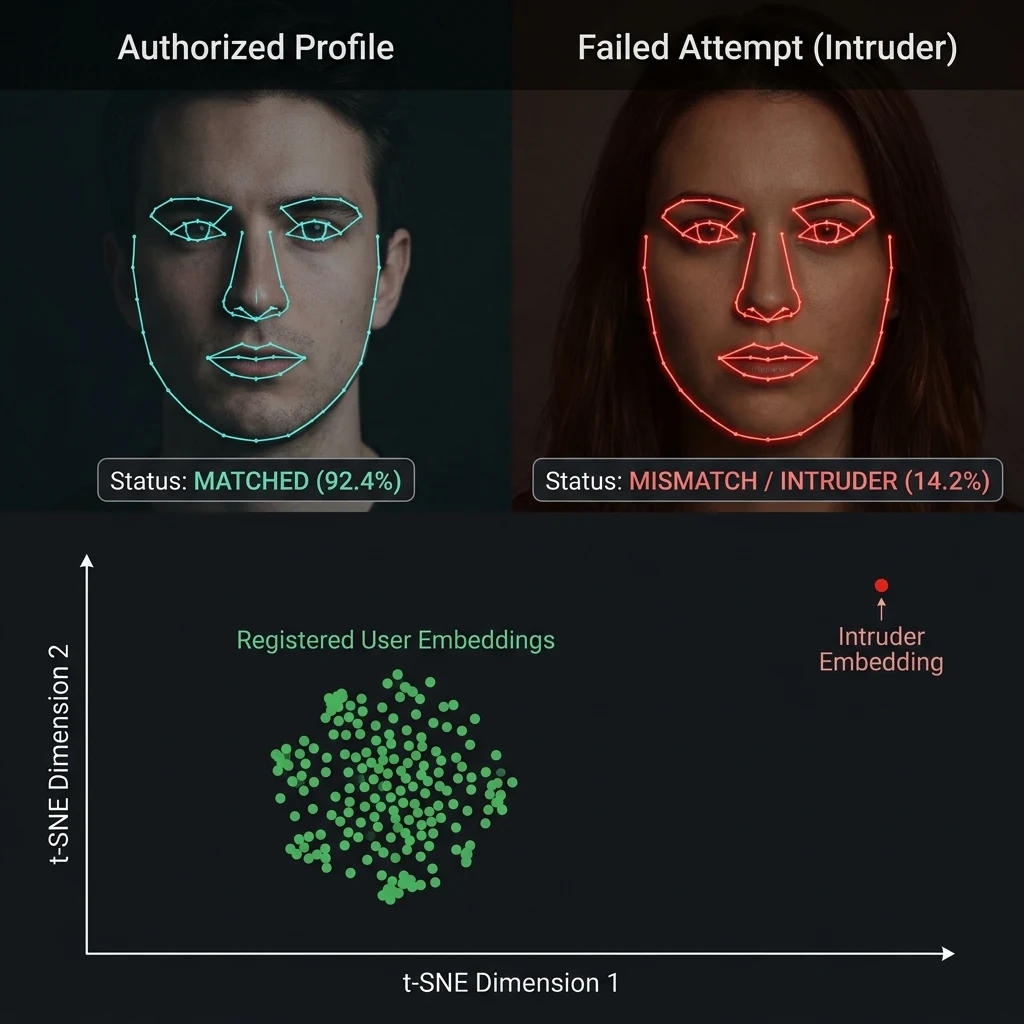
Authorized profile matched at 92.4% versus intruder mismatch at 14.2%, with a t-SNE plot separating user embeddings from the intruder embedding
Under The Hood

Why an intruder can't get close.

Every face is mapped to a 512-dimensional ArcFace vector, L2-normalised so that similarity reduces to a single dot product. A registered user's embeddings form a tight cluster; an intruder's vector lands far outside it.

The acceptance threshold is deliberately biased toward a near-zero False Acceptance Rate — ambient lighting drops or awkward angles fail safe to access denied, never to a breach.

Use Case — Caleb University
Imota, Lagos State, Nigeria

Lecture attendance,
signed with a face.

The same verification engine that guards the vault doubles as a campus attendance system. At the start of a lecture, each student checks in with a live face scan — the liveness challenge makes it impossible to sign in with a photo of a classmate, and every record carries a timestamp and a match score.

  • No proxy signing. A friend can't mark you present — the challenge-response scan only accepts the enrolled, living face.
  • Time-boxed sessions. The lecturer opens a check-in window; scans outside it are rejected automatically.
  • One enrolment, every course. The student's existing Face Vault profile works across all registered courses.
  • Exportable records. Per-course attendance sheets download as CSV for departmental records and exam eligibility checks.
CSC 415 — Computer Security Mon 9:00 AM · College of Pure & Applied Sciences · Check-in window 9:00–9:15
42 / 47 present
AO
Adebayo Oluwaseun21/8231
9:01 AM · 94.1% Present
CN
Chiamaka Nwosu21/8264
9:02 AM · 91.7% Present
IM
Ibrahim Musa21/8298
9:04 AM · 95.3% Present
?
Unknown face — claimed 21/8310snapshot saved to intruder log
9:06 AM · 13.8% Denied
TA
Temiloluwa Adeyemi21/8310
9:09 AM · 92.6% Present
FO
Folake Ogundipe21/8345
9:11 AM · 90.4% Present
Tested & Verified

Results from the deployed prototype.

Automated pytest coverage of every public endpoint, plus manual trials across lighting conditions, spectacles and deliberate presentation attacks.

Registration in under 4 secondsFull liveness sequence plus database insert, on a laptop with no GPU.
Login in about 2 secondsHalf of it is the live capture itself; matching takes milliseconds.
Every printed-photo attack rejectedThe no-motion guard caught 100% of static-image trials.
Video replays overwhelmingly rejectedRecorded motion rarely matches the randomly chosen challenge action.
Rate limits proven in operationThe sixth login attempt within a minute returns HTTP 429; the admin lockout engages and clears on schedule.
Cross-user access blockedDownloading another user's file from a valid session returns HTTP 403.
Tech Stack

Open-source, single-process, no GPU required.

The entire system runs as one Python process on commodity hardware — installable by any examiner without specialised equipment.

Python 3 + Flask 3Server-rendered app with Jinja2 templates and vanilla JavaScript for the camera flow — no build pipeline.
InsightFace buffalo_scRetinaFace detector plus ArcFace 512-D embedding network in one ONNX bundle, executed on CPU.
OpenCV + NumPyIn-memory frame decoding, landmark motion analysis and vectorized cosine matching.
SQLite + SQLAlchemyUsers, files, access logs and intruder records in a zero-administration database.
flask-wtf + flask-limiterCSRF protection on every state-changing request and per-IP rate limiting on sensitive endpoints.
pytestA hermetic suite with a monkey-patched detector — every public endpoint tested in under five seconds.